AI Image Editor
Compose anything on one AI canvas
Stack unlimited layers, order and group them with full z-index control, then set real depth of field, 3D parallax, and lens — and let AI blend it all into a single believable scene you can even share in 3D.
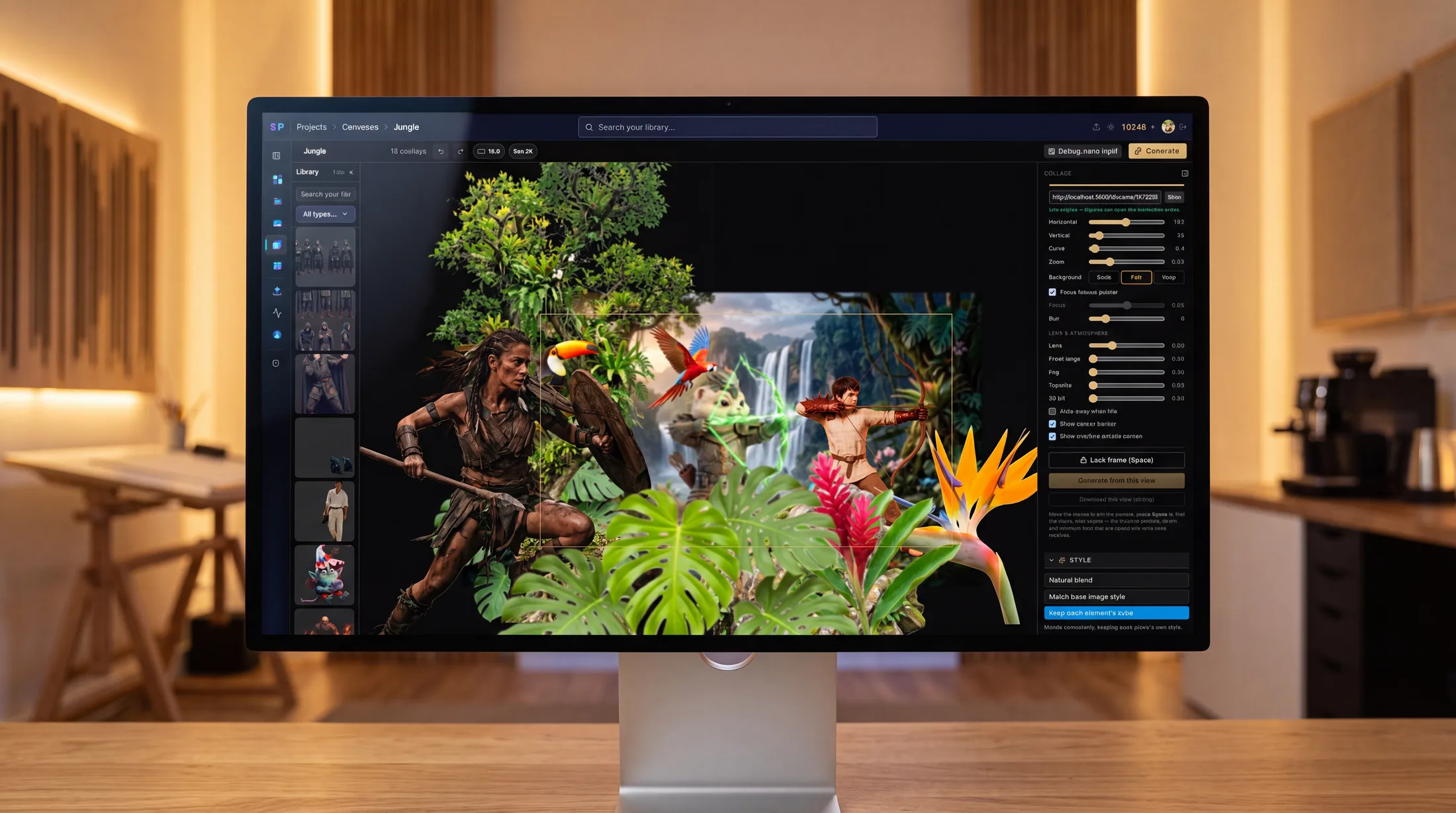
A real compositing canvas
Layers, z-order, depth, and lens — the controls a compositor expects, with an AI blend at the end.
Unlimited layers
Stack any number of image overlays on one canvas — each one stays selectable, movable, and fully editable.
Z-order & grouping
Bring to front, send to back, step forward or back, and group layers (⌘G) so a set moves and transforms as one.
Real depth of field
Focus follows your pointer — the layer you point at stays sharp while the rest falls off. Set exactly how thick the sharp band is.
3D parallax & tilt
Give the stack genuine depth: front planes move more than the back, and tilt the whole scene to peer into it in 3D.
Dolly, lens & atmosphere
Push in with a camera dolly or compress depth with a telephoto lens, then add distance haze and a vignette for aerial depth.
AI blend
Fuse every layer into one believable scene with consistent light and shadow — or keep each element's own style.
The depth engine
Flat layers become a space you can look into
This is what makes composites read as one photograph. Assign each layer a depth, and the canvas behaves like a real camera — focus, parallax, lens compression, and atmosphere all follow from it. Bake it into the final render, or keep it live and share an interactive 3D scene.
Focus follows pointer
Point at any layer — it stays sharp, the rest blurs by distance.
Depth-of-field thickness
Set how wide the in-focus band around the plane is.
Parallax strength
Front layers move far more than the back as you look around.
Dolly → telephoto
Perspective push-in, or a flatter, depth-compressed lens.
Atmospheric fog
Aerial haze that builds with distance, with an adjustable falloff.
3D tilt & vignette
Tilt the whole stack toward the pointer; darken the frame edges.
A real depth scene exported from the editor — move your mouse (or tilt your phone) to look around it.
Three steps to a finished composition
Drop in your layers
Bring product shots, references, backgrounds — arrange and order them freely on the canvas.
Set depth & focus
Point to set the focus plane, then dial in depth of field, parallax, lens, and 3D tilt so every layer sits in one space.
Blend or export
Blend it all into a single photo — or export the composition as an interactive depth scene anyone can explore.
Questions
What is this AI image editor?+
It's a layered canvas for composition: you arrange real images as stacked layers, control their order and depth, and an AI blends them into a single believable scene — with consistent light, shadow, and focus — instead of you masking and painting by hand.
Can I combine multiple images into one scene?+
Yes. Drop in as many images as you need, arrange them on one canvas as separate layers, then blend them into a single photo with consistent light and depth. You can fuse everything into one look, or keep each element's own style.
Does it have real depth of field?+
Yes — not a fake blur slider. Focus follows your pointer: the layer you point at stays sharp while the rest falls off by distance, and you set exactly how thick the sharp band around the focus plane is. Add distance haze and a lens vignette for true aerial perspective.
Can I control layer order and grouping?+
Full z-order control: bring any layer to front, send it to back, step it forward or backward, and group layers together (⌘G) so they move and transform as one.
Can I share the result as a 3D scene?+
Any composition can be exported as an interactive depth scene — a public link anyone can open and explore with their mouse, with the layers parallaxing in real 3D.
Start with a blank canvas
Free trial credits, no card required. Bring a few images and see what one AI canvas can do.
Open the canvas