Until now, making a video here meant one still and a prompt. Kling 3.0 Omni widens what you can hand over: a clip whose acting and camera you want kept, stills of the people or products who should appear, or both. It reads them and generates a new video informed by them, up to fifteen seconds long and up to 4K.
It arrives with three siblings from Kling, and we cover those too, because the four together answer most of the questions people ask us about video.
What Kling 3.0 Omni is
Kling is the video model family from Kuaishou, and 3.0 is the current generation. Omni is the variant of 3.0 that accepts references — omni as in every kind of input. Kling describes a video input precisely: the system extracts character traits and motion from the clip and generates a new video informed by the reference.
In practice that means the acting, the camera and the timing of your reference come through in a fresh render, and the people in your stills are the ones doing it.
How it moves on from Kling 2.6
Kling 2.6 was the model behind every video made here until this week, and it did the one thing we asked of it well. 3.0 Omni changes four things at once.
- Any length from three to fifteen seconds. 2.6, as it ran here, offered five or ten; if the shot needs seven, ask for seven.
- Sound. 2.6 rendered silent; 3.0 renders with audio when you start from stills.
- References. 2.6 took one still; Omni takes your still, up to four more, and a reference clip.
- 4K. A native render, measured at 2880 pixels on a square frame at 24 frames a second.
Keeping the performance: what happened when we tried it
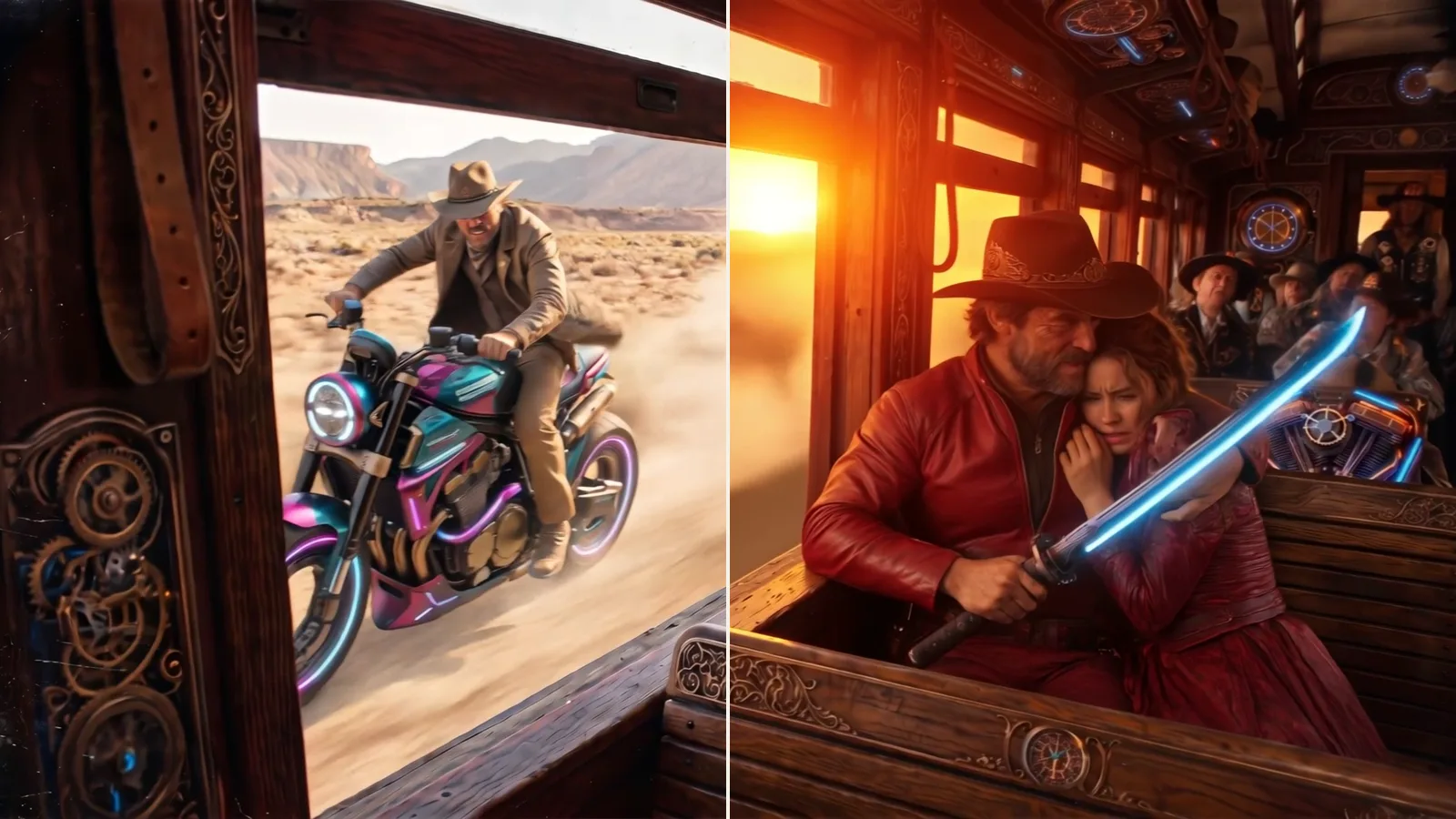
We took a ten-second Kling clip made here — a cowboy in a steampunk train carriage, a rider keeping pace outside the window — and handed it to Omni as the reference with one instruction: same shot, same camera and same acting, but the hero in a red leather jacket and the train at sunset.
The camera move, the embrace, the blade and the rider outside all survived the trip. The jacket and the sunset arrived as asked. And it kept the reference's own hero, which is what a reference is for: to change who is in the shot, add a still of the new person to the request, and Omni puts them into the same performance.
What it takes, and what comes out
- Inputs: your source still, up to four more stills, and one reference clip between three and ten seconds long. Any clip you have made in the project can be the reference.
- Length: three to fifteen seconds, any whole number.
- Size: standard, professional, or 4K — a native render.
- Sound: on when you start from stills. With a reference clip the render is silent, so the clip's movement is the only thing it follows.
- Time: about five minutes. Plain Kling 3.0 is nearer two; the reference work is what you are waiting for.
Three ways to use it
- Keep the people, change everything else: four stills of a model or a product, a prompt for the scene, no clip. Omni holds the faces and the product through the shot.
- Keep the performance: a clip of someone walking, turning, presenting, plus a still of who should be doing it. The movement and the timing survive; the person changes.
- Both: one reference clip and up to four stills. This is the mode for a campaign that has to read as the same cast in the same style across several shots.
The siblings, and when each is the right one
We tested Kling's current price list and kept four models. They sit side by side in the same list, each with what it does written on its card.
- Kling 3.0: the fast one. Three to fifteen seconds, standard, professional or 4K, sound optional, about two minutes. The Kling that lands on an end frame you pick — give it a second still and the clip travels there.
- Kling 3.0 Omni: this post. References in, a new clip out, up to fifteen seconds and 4K.
- Kling O1: the same references at Kling 3.0 prices when a clip is in the mix. Up to ten seconds, standard or professional, silent. Use it to find the shot, then render the keeper on Omni.
- Kling Motion Control: the movement in a real clip, performed by the person in your still. Give it a still and a performance clip of three to thirty seconds; the result is the clip's length and is billed by it. A switch chooses whether the face follows the still or the clip.
What it costs
Every Kling clip is priced per second of output — per second of the reference clip, for Motion Control — and the number of credits is on the button before you press it, moving as you change the length, the size and the sound. A reference clip makes an Omni second cost more than a plain one, and 4K more again. Nothing is charged until the clip is finished.